Available on the Mac App Store

Unix Timestamps.
One Click.

The Unix timestamp converter for macOS – right in your menu bar. Auto-detects seconds and milliseconds from your clipboard, converts and copies in one click. Runs fully offline – no internet needed, your data never leaves your Mac. No subscription, no annoying ads.

Download on the App Store See features ↓

$2.99 · One-time · macOS 14+ · No subscription

Unix timestamp converter for Mac – convert in the menu bar (dark mode) Unix timestamp converter for Mac – convert in the menu bar (light mode)
9+
Output formats
1×
Click to convert
0
Subscriptions
0
Data collected

Convert a timestamp
in one click.

UnixTime converts Unix timestamps without opening a window or filling in a field — it reacts straight to your clipboard.

01
Left-click: smart convert

UnixTime reads your clipboard, detects whether it's a timestamp or a date, converts it, and copies the result — all in one click. Nothing in clipboard? You get the current timestamp.

02
📋
Right-click: every format

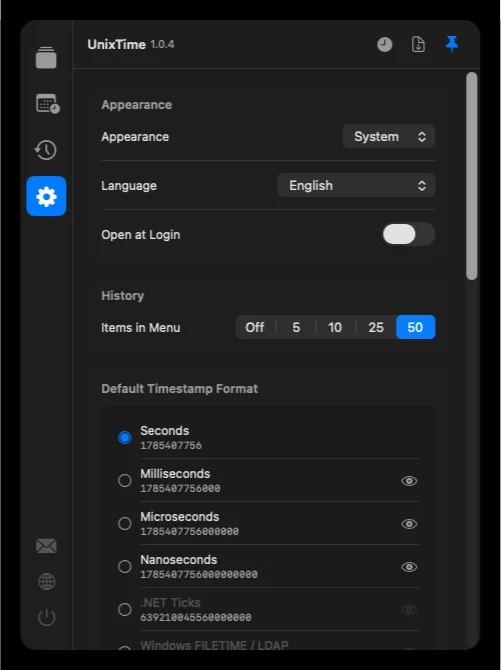
A clean panel shows all formats at once. Click any row to copy it. Reorder and hide formats via drag & drop — show only the ones you actually use.

03
🗓
Generator: any point in time

Need a timestamp for a specific date or time offset? Enter year, month, day, hour, minute, second and timezone. Add or subtract time spans. Copy in one click.

Built for the way
developers work.

Keyboard-free, no context-switching. Just your menu bar, right where you need it.

Convert Unix timestamps into many formats on Mac Convert, calculate, or randomly generate dates & timestamps on Mac Conversion history showing the source app Settings of the UnixTime menubar converter Define any number of custom formats with placeholders Tooltips on mouseover and notifications when copying
🗂
Convert Unix timestamps to any format

From raw epoch seconds to localized long-form dates — all without copy-pasting into a browser tab.

Seconds (s) Milliseconds (ms) Microseconds (µs) Nanoseconds (ns) .NET Ticks Windows FILETIME/LDAP Chrome/Webkit Mozilla PRTime Cocoa/NSDate HFS+ Julian Day Number ISO 8601 UTC ISO 8601 local European US British Japanese RFC 2822 Unix readable Custom formats
🔍
Clipboard-aware tooltip

Hover over the menu bar icon to see what's in your clipboard and what UnixTime will do — before you even click.

🕐
Conversion History

Quickly access previous conversions and copy them again – no need to redo anything. The history shows the copied value, its calculated counterpart, the source app, and the timestamp at a glance.

🌍
Full timezone support

Work across timezones with the date generator — pick any timezone for your timestamp output.

🎨
Light, dark, system

Follows macOS appearance automatically, or pin to light or dark mode.

🌐
12 languages

Fully localized in 12 languages: English, Dutch, French, German, Hindi, Italian, Japanese, Portuguese, Russian, Simplified Chinese, Spanish, Turkish

🔀
Random Timestamps

Generate random timestamps for full days including time, for specific days with a fixed time, or just a random time within a single day.

♾️
Unlimited Custom Formats

Create as many custom date formats as you need. Weekdays and months are automatically displayed in the app's language. Add custom strings or include the calendar week.

Clean & Clear

A thoughtfully designed UI that focuses on what matters. Helpful tooltips and copy notifications keep you informed at every step.

⚙️
Fully Configurable

Unix and epoch timestamps exactly the way you need them: seconds or milliseconds, custom format strings, custom order – and hide any formats you don't use.

♥️
Made with Love

Crafted with attention to detail – with the goal of becoming the best and most complete timestamp app for Mac. Missing a feature? Your feedback is always welcome.
No nonsense.
Ever.

UnixTime is a native macOS app. No Electron, no cloud, no account, no ads — and fully usable offline.

🔒
Fully offline

Zero network connections. Your clipboard data never leaves your machine.

🚫
No tracking

No analytics, no telemetry, no crash reporters phoning home.

Native Swift

Built natively for macOS. Fast startup, minimal memory footprint, battery friendly.

💳
One-time purchase

Pay once, own it forever. No subscription, no in-app purchases, no upsells.

Common questions about
Unix timestamps & UnixTime.

Short, honest answers. See the full FAQ for everything else.

The fastest way is a native menu bar app like UnixTime: copy the timestamp, click the menu bar icon, and the converted date is on your clipboard. No browser tab required.

macOS doesn't ship with a built-in Unix timestamp converter. You can use the Terminal (date -r 1720512000), a web tool like epochconverter.com, or a native app. Native apps are fastest because they don't require switching context to a browser or terminal. UnixTime lives in your menu bar, auto-detects timestamps in seconds or milliseconds from your clipboard, and copies the result back automatically — one click, done.

A Unix timestamp is a number representing the seconds elapsed since January 1, 1970 UTC (the "Unix epoch"). It's the standard way computers store and exchange points in time, used in APIs, logs, and databases.

Unix timestamps come in two common variants: seconds (10 digits, e.g. 1720512000) and milliseconds (13 digits, e.g. 1720512000000). JavaScript, MongoDB, and many modern APIs use milliseconds; PostgreSQL, Redis, and traditional Unix tools use seconds. Both refer to the same moment — just at different precision. UnixTime automatically detects which format is on your clipboard and converts it to a readable date.

For daily use, a native menu bar app is the best choice — it's always accessible, works offline, and doesn't require a browser tab. UnixTime is purpose-built for this workflow, with clipboard auto-detection, custom formats, and history.

The "best" tool depends on your use case: for one-off conversions, a web tool like epochconverter.com is fine; for command-line workflows, date -r works; for repeated daily use, a native menu bar app saves the most time. UnixTime combines automatic clipboard detection, configurable date formats (ISO 8601, RFC 2822, custom Unicode), a history of past conversions, and native macOS integration — all in a lightweight, offline app.

UnixTime is available in 12 languages: English, Dutch, French, German, Hindi, Italian, Japanese, Portuguese, Russian, Simplified Chinese, Spanish and Turkish. It follows your Mac's system language automatically.

Beyond the interface, the output formats are localized too: weekday and month names appear in the selected language. Set the language automatically (macOS system language) or manually in settings — changes take effect instantly, no restart.

Yes — UnixTime is a native macOS app that runs completely offline, with no network requests and no telemetry. Everything happens locally on your Mac.

Most Unix timestamp converters are web-based, which means every conversion sends data through a server. That's fine for public timestamps but problematic when you're working with sensitive log data or under strict network policies. UnixTime is sandboxed and has no network entitlement — it literally cannot make outbound connections. All conversions, history, and settings stay on your device.

Both count time from January 1, 1970 UTC, but at different precision: seconds have 10 digits (e.g. 1720512000), milliseconds have 13 digits (e.g. 1720512000000). They represent the same moment, just scaled by 1000.

JavaScript's Date.now(), MongoDB's ISODate, and most modern web APIs use milliseconds. PostgreSQL's to_timestamp(), Redis TTLs, the Unix date command, and traditional Linux tools use seconds. When you see a 10-digit number, it's seconds; 13 digits means milliseconds. UnixTime auto-detects both and converts correctly regardless.

Simple pricing for
a simple tool.

Mac App Store
$2.99

One-time · No subscription · Yours forever

All current features
All future updates included
Works on all your Macs (Family Sharing)
No account, no registration
macOS 14 Sonoma and later
Download on the App Store

Requires macOS 14.6 or later · Apple Silicon & Intel