Ticks are not Unix nanoseconds
Choose .NET Ticks as the source format instead of interpreting the number solely by its length.
UnixTime · .NET & Cross-platform Development
When your service returns ticks, you need a converter that knows their epoch. Select .NET Ticks in UnixTime and translate individual values with the menu bar icon or ⌘⌃U.
Convert .NET ticks on Mac: preserve 100-nanosecond resolution and display custom date formats without rounding.
Sound familiar?
Choose .NET Ticks as the source format instead of interpreting the number solely by its length.
For a FILETIME value, switch explicitly to Windows FILETIME / LDAP.
Copy the result as ISO 8601 UTC to compare it with interface data.
Your next time value
Set .NET Ticks as the default timestamp format in UnixTime settings.
Copy the ticks value, then click the menu bar icon or press ⌘⌃U.
Paste the UTC result into your debug notes and compare the time.
The example uses UTC. Your output follows your selected default formats. Direct insertion via a shortcut requires macOS Accessibility permission.
Formats and keyboard shortcuts explained →
Precision for log analysis & forensics
Convert Unix timestamps with nanosecond precision. UnixTime preserves fractional seconds from numeric input timestamps. No floating-point rounding. No zeros recreated from whole seconds.
17908128001234567892026-10-01 00:00:00.123456789 UTCExample: Unix nanoseconds, a custom date format and the UTC time zone. Source accuracy still matters; conversion does not invent extra measurement precision.
| Pattern | Display precision | Example |
|---|---|---|
SSS | Milliseconds (3 digits) | .123 |
SSSSSS | Microseconds (6 digits) | .123456 |
SSSSSSSSS | Nanoseconds (9 digits) | .123456789 |
Use, for example yyyy-MM-dd HH:mm:ss.SSSSSSSSS. Nine digits display the full nanosecond fraction. Three or six display only the leading digits, without rounding up. A pattern without S does not display fractional seconds.
Keyboard shortcuts on your Mac
Copy your time value and click the menu bar icon — or press ⌘⌃U. Reassign any of the four shortcuts to suit your workflow.
⌘ = Command · ⌃ = Control · ⌥ = Option. Inserting, replacing and appending text require macOS Accessibility permission and an editable text field. Clipboard conversion does not require that permission.
Keyboard shortcuts explained →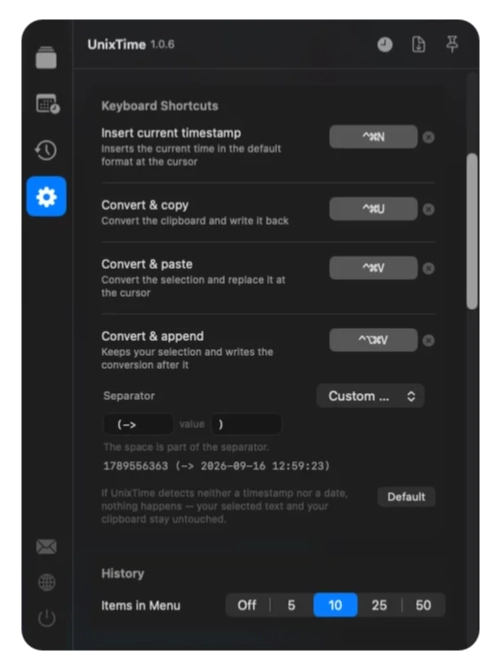
Before you start
A bare ticks value does not contain that information. Check whether the source value represents UTC or local time. This example uses UTC.
Yes. Reading .NET ticks preserves their 100-nanosecond resolution. SSSSSSSSS displays nine fractional digits; the last digit of a ticks-based value is zero.
Use a custom date format: SSS for milliseconds (3 digits), SSSSSS for microseconds (6 digits), or SSSSSSSSS for nanoseconds (9 digits). Choose nine digits to display all available nanoseconds. Shorter patterns show only the leading digits, without rounding up.
UnixTime must be running on your Mac. All shortcuts can be reassigned. Replacing, inserting and appending text require macOS Accessibility permission and an editable destination. Converting the clipboard with the menu bar icon or ⌘⌃U does not require that permission. ⌘ means Command, ⌃ means Control and ⌥ means Option (Alt).
Yes. Conversion, the date generator and history run locally. They need neither an account nor an internet connection. UnixTime is a one-time purchase without a subscription; see the Mac App Store for the current price.
For your next timestamp
Install UnixTime, choose your default formats and try the workflow with your own time value.
