Boundary cases need specific times
Set the date, time and time zone explicitly so your test case is easy to reproduce.
UnixTime · QA & Testing
Expired sessions, future appointments, midnight: set your test time in the UnixTime date generator and copy the value your test needs.
Check timestamp test data on Mac: preserve fractional seconds with nanosecond precision, without rounding.
Sound familiar?
Set the date, time and time zone explicitly so your test case is easy to reproduce.
Add or subtract time intervals in the generator instead of calculating the timestamp yourself.
Copy the generated value into your test data and record the selected time zone in the test case.
Your next time value
Open the date generator and choose 1 October 2026 at 00:00:00 UTC.
Use milliseconds if that is what your test system expects.
Copy the value into your test case. Adjust the time to create further cases.
The example uses UTC. Your output follows your selected default formats. Direct insertion via a shortcut requires macOS Accessibility permission.
Formats and keyboard shortcuts explained →
Precision for log analysis & forensics
Convert Unix timestamps with nanosecond precision. UnixTime preserves fractional seconds from numeric input timestamps. No floating-point rounding. No zeros recreated from whole seconds.
17908128001234567892026-10-01 00:00:00.123456789 UTCExample: Unix nanoseconds, a custom date format and the UTC time zone. Source accuracy still matters; conversion does not invent extra measurement precision.
| Pattern | Display precision | Example |
|---|---|---|
SSS | Milliseconds (3 digits) | .123 |
SSSSSS | Microseconds (6 digits) | .123456 |
SSSSSSSSS | Nanoseconds (9 digits) | .123456789 |
Use, for example yyyy-MM-dd HH:mm:ss.SSSSSSSSS. Nine digits display the full nanosecond fraction. Three or six display only the leading digits, without rounding up. A pattern without S does not display fractional seconds.
Keyboard shortcuts on your Mac
Copy your time value and click the menu bar icon — or press ⌘⌃U. Reassign any of the four shortcuts to suit your workflow.
⌘ = Command · ⌃ = Control · ⌥ = Option. Inserting, replacing and appending text require macOS Accessibility permission and an editable text field. Clipboard conversion does not require that permission.
Keyboard shortcuts explained →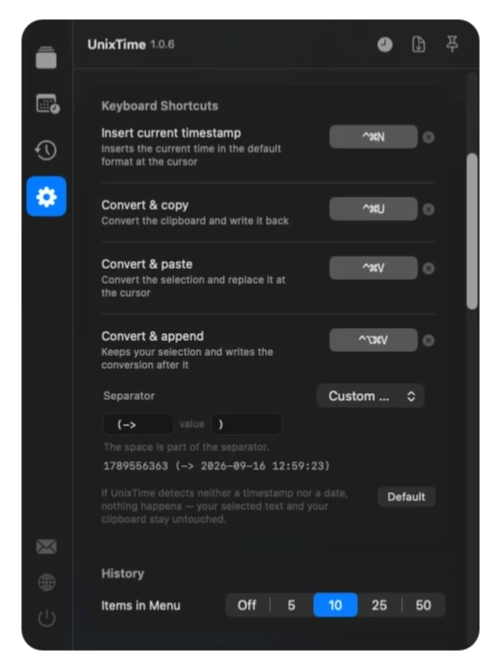
Before you start
No. UnixTime generates and converts time values. Test execution and assertions remain in your testing tools.
Yes. The generator offers random dates and times. Save the specific generated value when you need a reproducible test.
Use a custom date format: SSS for milliseconds (3 digits), SSSSSS for microseconds (6 digits), or SSSSSSSSS for nanoseconds (9 digits). Choose nine digits to display all available nanoseconds. Shorter patterns show only the leading digits, without rounding up.
UnixTime must be running on your Mac. All shortcuts can be reassigned. Replacing, inserting and appending text require macOS Accessibility permission and an editable destination. Converting the clipboard with the menu bar icon or ⌘⌃U does not require that permission. ⌘ means Command, ⌃ means Control and ⌥ means Option (Alt).
Yes. Conversion, the date generator and history run locally. They need neither an account nor an internet connection. UnixTime is a one-time purchase without a subscription; see the Mac App Store for the current price.
For your next timestamp
Install UnixTime, choose your default formats and try the workflow with your own time value.
